AngularJS Directives with JSON arguments
Recently I wanted to write some kind of generic directive which loads some initial data into a specific scope. Something like:
my-load-id="100"Of course, this is not very generic and I thought it would be a good idea to use the powerful AngularJS expressions and create a JSON object. More like:
my-load="{'key':'value'}"Now this approach would be fine, but the single quotes are not valid json. If you take this attribute value and perform angular.fromJson on it, it will fail miserable. In turn, AngularJS expression can handle this perfectly. With expressions it would look like:
my-load="\{\{ \{'key':'value'\} \}\}"The double-brackets on the beginning and the end make the inner json to an expression. So far so good. Let’s look at a first simple example how to evaluate that.
Case 1: using an event handler
This is my link:
<a href="#" my-show-modal="#taskForm"
   my-show-modal-data="\{\{ \{ 'active': 'true' \} \}\}">Link</a>
I want it to open a modal (Twitter Bootstrap, to be specific). Basically my goal is to initialize my modal with some values, which are delivered as JSON and by the my-show-modal-data attribute. I even tell my directive which modal to open (#test), which is where the magic happens.
directives.directive('myShowModal',
    function () {
        return {
            link:function (scope, element, attrs) {
                var openDialog = function() {
                    if( attrs.myShowModalData !== undefined) {
                        var data = attrs.myShowModalData;
                        data = angular.fromJson(data);
                        // do something with data
                    }
                };
                element.bind('click', openDialog);
            }
        };
    });
Basically I am creating a simple directive here with defining a “link” function. The directive is on myShowModal of course, as it does only make sense to set data when a modal is defined. The interesting part is inside the openDialog function. I can access my data from the attrs argument, right with the name. Its a String (you can test it with angular.isString()) which comes in the right format (by magic). The whole beast is executed when somebody clicks on it.
Simple, right?
Now the execution happens after the everything is in place. In the following use case things are not so easy.
Putting initial values from the directive right in the scope
What if we would leave out the click handler? Then we have a problem. Imagine you would like to load some data into your controller, without any action. Like that:
<div ng-controller="MyController"
     my-load="\{\{ \{'test':'active'\} \}\}" > ... </div>
Now let’s make a simple directive:
directives.directive('tabLoad', function() {
    return {
            link: function (scope, element, attrs) {
                console.log( attrs);
                console.log( attrs.tabLoad );
            }
        }
});
It should first output all my attributes, then the tab-load value. Which should be a String. But I were running into trouble:
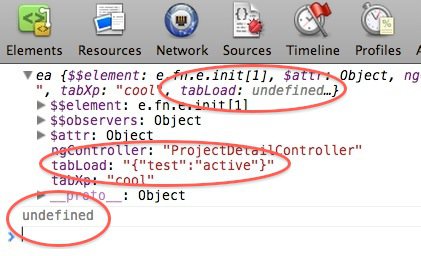
I marked 3 interesting places of my Chrome Debugger for you. First, you see the summary output of attrs. tabLoad is undefined. If you open the object, you’ll see the expected value. But when you access it in your code, you get undefined. After programming use case 1, this behavior is not really what one would expect. It kept me thinking for a while.
I explain it like that. When we link the directive, the expression is not executed, while “static values” are known. This is why we get undefined in the summary and undefined from the second console.log. When we open the object tree in the browser, the expression has been executed in the meantime and thus you can see it.
Once I had that theory in mind, I could see the difference to use case 1: the event handler is executed after the expression has been executed. That way it can access the JSON.
Still I wanted some generic function!
Reading in the directive docs I found the relevant information:
Use $observe to observe the value changes of attributes that contain interpolation (e.g. src=””). Not only is this very efficient but it’s also the only way to easily get the actual value because during the linking phase the interpolation hasn’t been evaluated yet and so the value is at this time set to undefined.
Now thing became to clear up. You can “observe” the attribute value. Once the expression is executed, the observer will fire and you’ll get want you want:
directives.directive('tabLoad', function() {
    return {
            link: function (scope, element, attrs) {
                attrs.$observe('tabLoad', function(val) {
                    var data = angular.fromJson(val);
                    console.log(data);
                    console.log(data.test);
                    // do something
                });
            }
        }
});
This is not very elegant, but have no idea how to do it otherwise.